
Context
Transitioning into college life can be both exciting and overwhelming—especially for new students at
Algonquin College. For international students, the challenge is often greater as they adjust not only to
academic expectations but also to a new culture, environment, and support systems. Managing time effectively
becomes crucial for balancing academic responsibilities, part-time work, and personal life.
To support student success, Algonquin College provides a variety of digital calendars that outline
academic schedules, campus events, and other key activities. While these resources are intended to help
students stay organized, new students may not always find them intuitive or easy to use. Navigating between
multiple calendars, understanding their specific purposes, and integrating them into daily planning can be a
confusing experience—especially during the critical early weeks of the semester.
Problem Space
Despite the availability of college-provided calendars, many new students face challenges in effectively using them to manage their academic and extracurricular responsibilities. This is particularly true for international students who may be less familiar with the systems and expectations of post-secondary education in Canada.
Students often struggle to:
- Identify the most relevant calendars from a range of options
- Access and interpret calendar information across multiple platforms
- Integrate college calendars with personal scheduling tools
- Maintain consistency and clarity in their planning habits

Objective
This study aims to better understand how new students interact with college-provided calendars and how those interactions affect their ability to manage academic and personal responsibilities. Specifically, the study seeks to:
Objective 1
Identify how students currently manage their schedules, including their preferred tools, frequency of use, and awareness of Algonquin College’s calendar systems.
Objective 2
Explore students’ experiences with using multiple calendars, uncovering the tools they use, common challenges they face, and the features they value most.
Objective 3
Evaluate students’ overall perceptions of the college calendars, examining barriers, coping strategies, and opportunities for improvement.
Methodology
To understand how new students at Algonquin College engage with college-provided calendars, we used a mixed-method approach combining surveys and interviews.
Phase 1: Survey
We began with a short survey designed to gather quantitative insights and screen participants for interviews. The survey included a consent form and was shared through posters, student groups, and in-person outreach. Our goal was to collect 100 responses from Level 1 students.
Phase 2: Semi-Structured Interviews
From the survey respondents, we selected participants for in-depth, semi-structured interviews to explore their experiences in more detail. We aimed to conduct 10 interviews. Each session was led by one interviewer and one notetaker, with participant permission to record the conversation for accuracy and analysis.
This approach allowed us to gather both broad trends and personal insights to better understand the calendar usage experience from a student perspective.

Participants
This research focused on first-semester students at Algonquin College, as they are best positioned to share early experiences with the college's calendar system. We collected survey responses from 126 new students to understand general patterns and challenges. From this group, 10 participants were selected for follow-up semi-structured interviews to gain deeper insights into their experiences and needs.
Findings
Survey Findings
We collected survey responses from 126 students, 102 of whom were in their first semester at Algonquin College. Of these, 60 were international and 42 were domestic students, offering a balanced view of early student experiences.
Usage & Awareness
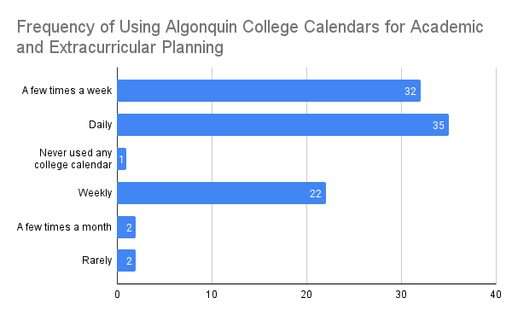
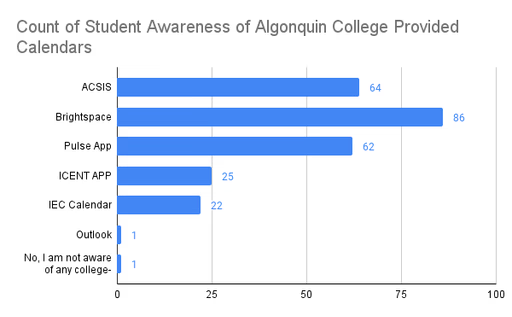
Calendar usage varied: 35 students checked the college calendar daily, while others used it weekly or occasionally. Brightspace was the most recognized and used tool, followed by ACSIS and the Pulse app. Awareness of other platforms like ICENT, IEC Calendar, and Outlook was significantly lower.
Preferences & Satisfaction
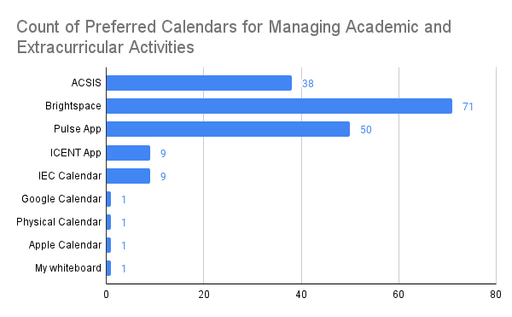
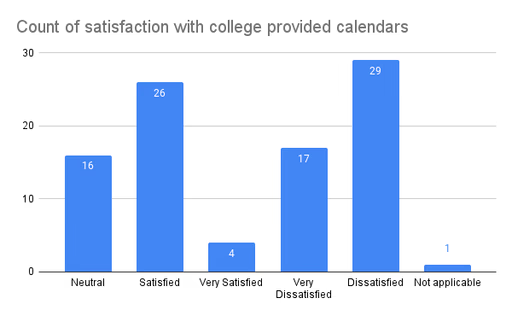
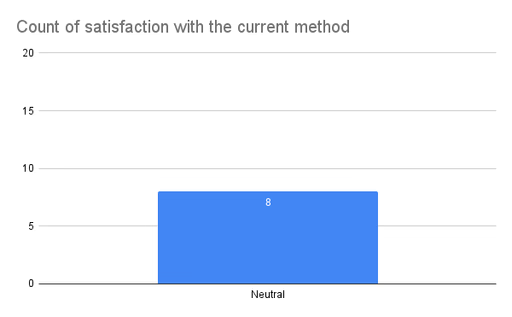
Brightspace, Pulse, and ACSIS were the most preferred tools, but satisfaction levels were generally low. Around 60% of students expressed dissatisfaction or neutrality toward the current systems, highlighting a need for a more integrated and user-friendly calendar solution.
Alternative Tools & Methods
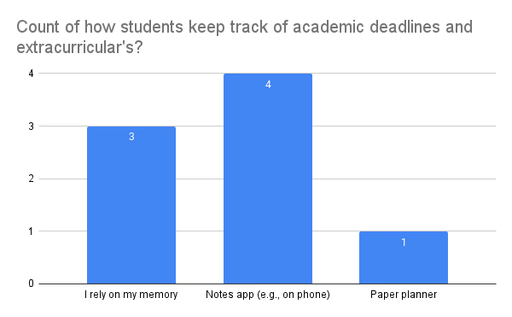
Some students used personal tools like Google Calendar, Apple Notes, or physical planners. A few relied solely on memory. These mixed approaches suggest a lack of consistency and point to the need for a centralized calendar system that better supports student planning needs.
Interview Findings
To gain deeper insights into students’ scheduling experiences, we conducted semi-structured interviews
with
10 first-semester students (2 domestic, 8 international). Key themes emerged around how students manage
their
time and interact with the college’s calendar tools:
Balancing School & Life
Students strive to balance academics, extracurriculars, and personal life, often prioritizing immediate tasks over long-term planning. International students, in particular, emphasized the importance of integrating into their new environment while staying on top of schoolwork.

Fragmented Tools
Students use a mix of physical and digital tools—planners, apps, notes, and widgets—which often leads to disorganization. The lack of integration across platforms creates confusion and extra effort to manage their schedules.
Need for Integration
Participants highlighted the need for a centralized system that syncs academic and personal commitments across devices. Current tools like Brightspace don’t integrate well with personal calendars, resulting in missed deadlines and added stress.
Positive Highlights
The Pulse app stood out as a favorite for its intuitive interface and helpful features like visual task tracking and reminders. These features were seen as effective and should be considered in future design improvements.
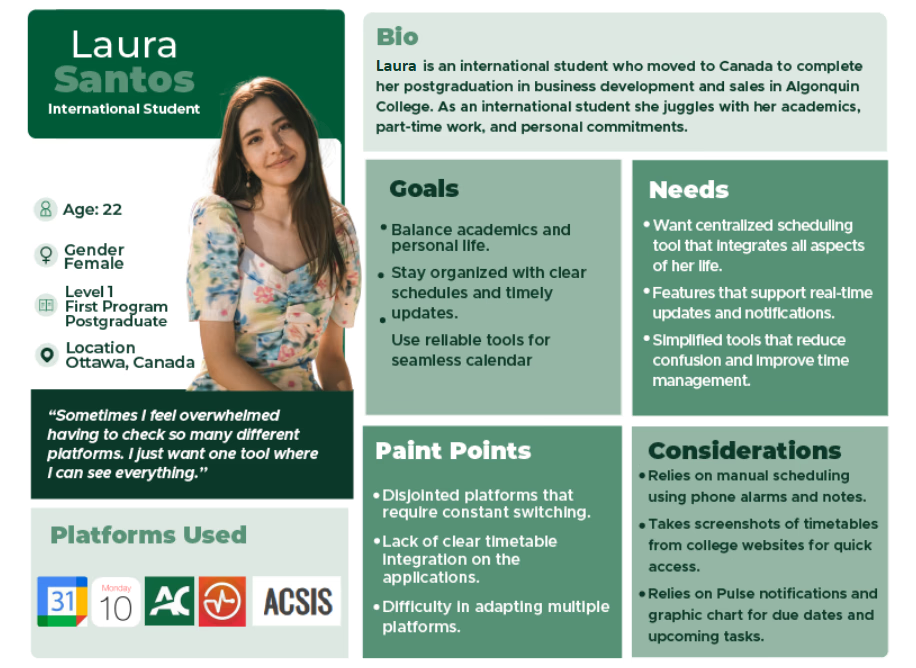
Persona
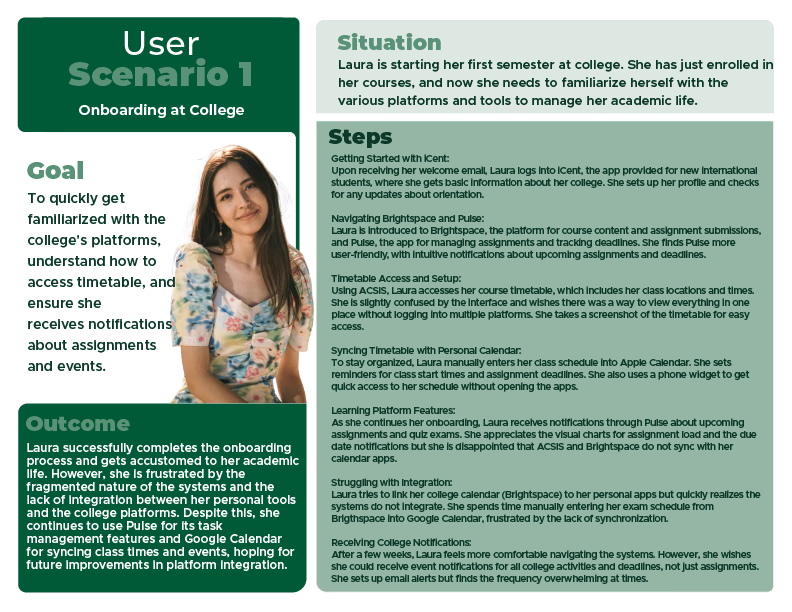
User Scenario
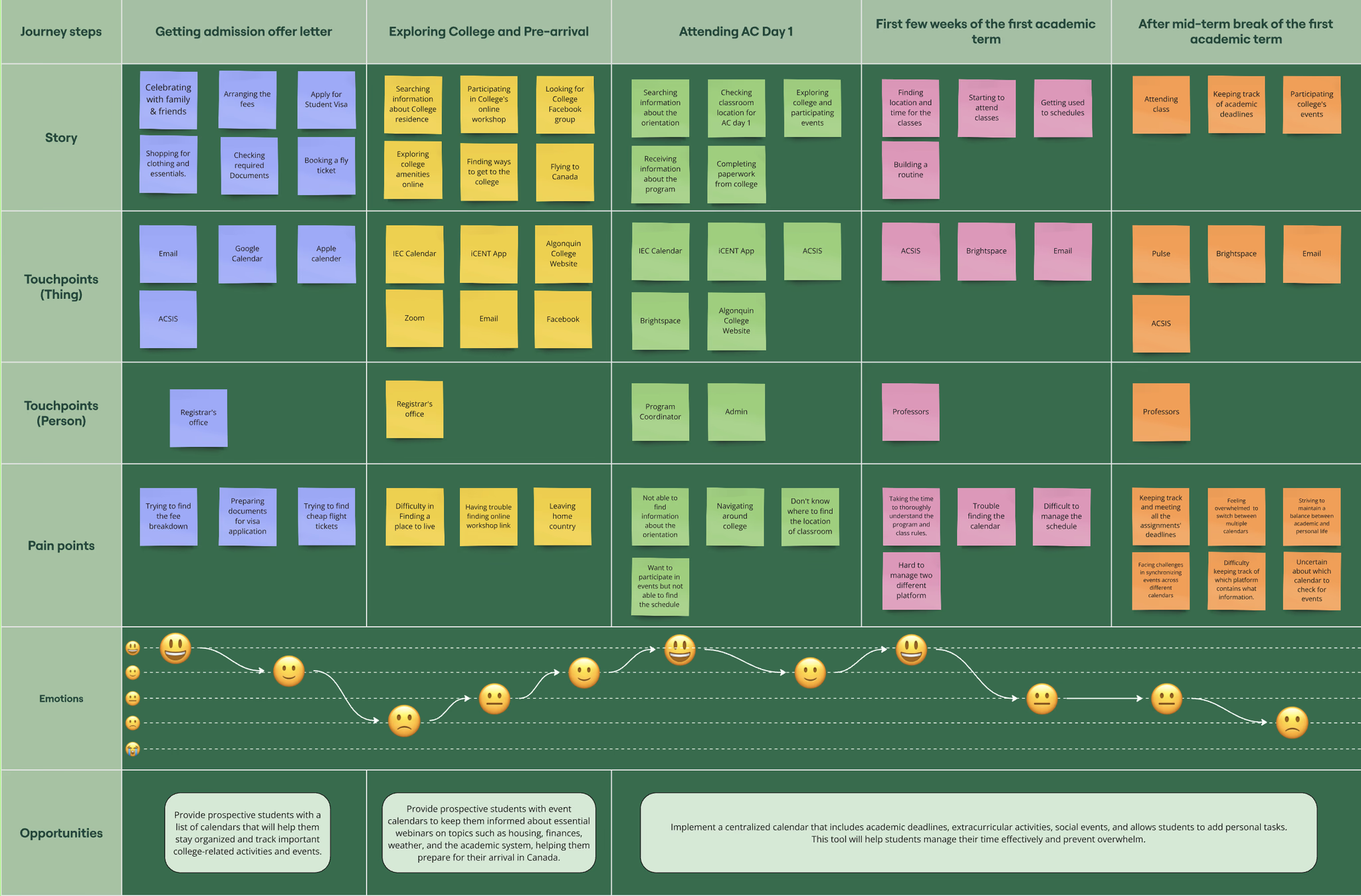
Journey Map
Insights & Recommendations
Based on the research findings, several clear opportunities for improvement emerged:
- Centralized Calendar Integration Students need a unified platform that combines institutional tools with personal calendars like Google or Apple Calendar. Features like real-time notifications, task tracking, and multi-device syncing would streamline time management and reduce confusion.
- Improved Accessibility Navigation and usability of current calendar tools should be enhanced, especially on mobile. Clear onboarding, intuitive interfaces, and better compatibility will reduce reliance on memory or informal methods like handwritten notes.
- Flexible Scheduling Tools Students benefit from dynamic scheduling features such as drag-and-drop task management, weekly views, and built-in collaboration tools. Flexibility is key to handling varied academic and personal responsibilities.
- Visual & Interactive Elements Incorporating visual aids—like progress bars, timeline views, and reminders—can boost user engagement. Pulse app features stood out and could inspire enhancements across all calendar platforms.
Limitations
While this study offers useful insights, there are a few limitations to consider. Most participants were international students, with limited input from domestic students—meaning the findings may not fully reflect the broader student population. Additionally, the small sample size and absence of subject matter expert (SME) perspectives may limit the depth and generalizability of the results. Responses were also influenced by personal experiences, which could introduce bias.
Learning
This project highlighted the complexity students face in managing multiple calendars and how fragmented tools can impact their academic and personal balance. I learned the value of combining surveys with interviews to uncover both broad trends and deeper user insights. It reinforced the importance of designing centralized, user-friendly solutions with flexible and visual features tailored to students' needs. Most importantly, it taught me that even simple tools like calendars require thoughtful, user-centered design to truly support the people using them.